


BioLife Plasma Services
3.811.85K Reviews
App Specs
- Version
- 3.2.1
- Updated On
- License
- Free
- Downloads
- 1,000,000+
- Developer
- Takeda Pharmaceuticals
- Categories
- Medical
- Platform
- Android, iOS
Screenshots
 Analysis by AppCompare
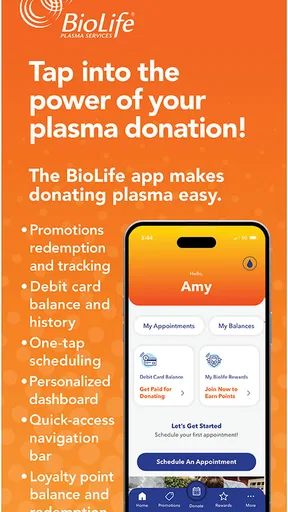
I see BioLife Plasma Services as a practical companion for people who already use BioLife’s plasma donation centers, rather than a general-purpose health app. Its main appeal is putting donation-related tasks in one place: planning a visit, keeping an eye on your history, and checking donor updates. That can make a recurring commitment easier to manage, though the app is most useful when you are comfortable handling the donation process through BioLife rather than looking for broader medical guidance.
A focused tool for a recurring routine
This is a free medical app from Takeda Pharmaceuticals, and its purpose is narrower than the word “health” might suggest. I would not use it to organize prescriptions, track symptoms, or replace advice from a clinician. Its value is in the practical details around donating plasma. That focus is a strength for an established donor: instead of relying on memory, scattered notes, or repeated calls, you can use one dedicated place for the tasks the app supports.
There is a useful distinction between making a donation easier to arrange and deciding whether you are ready to donate. An appointment in an app is not a medical clearance, and a digital record should not be treated as a substitute for the screening process at a center. I would use the app to manage logistics, then follow the center’s instructions and ask staff about health questions or eligibility concerns.
Where it fits among the alternatives
Compared with calling a center or navigating a website, an app-based appointment workflow can be more convenient when you already know you want to visit and simply need to choose a time. The donation history also gives the process some continuity that a calendar reminder alone cannot provide. On the other hand, a paper note or phone calendar may be enough for someone who donates rarely and does not need the additional donor-specific information.
It is also different from a general wellness tracker. Those apps are built around broad personal health habits; BioLife Plasma Services is designed around the BioLife donation relationship. That makes it a better fit for donors who want a dedicated tool, but a poor choice for someone seeking a single dashboard for appointments across different providers or a comprehensive personal health record.
Small habits that make it more useful
I would check appointment availability before building a donation visit into a busy day, then save the confirmed time in my regular calendar as a backup. That simple second reminder is helpful if I use several calendars or do not open the app every day. I would also review my donation history after a visit rather than waiting until I need to recall when I last went; a recent record is easier to compare with personal notes if anything looks unexpected.
For a first-time donor, I would treat the app as a planning aid, not as a complete guide to what the visit involves. Before setting aside travel time, it makes sense to read the center’s current instructions and bring any questions to its staff. A person who is unsure about eligibility should get guidance directly from the center instead of assuming that an open appointment means they can donate.
Worth Reading Before You Choose

EA SPORTS FC Mobile 26 Is a Bigger Football Game, but It Takes Time

Flipboard Shows What News Apps Must Do Beyond the Feed

Switching to Android Auto Means Rethinking Your Driving Routine

Google Calendar Makes a Crowded Week Easier to Manage

Ludo King Makes the Most of the Minutes Between Plans

Baby Panda World Brings Quick Play to Modern Phones, but Its Game Library Feels Busy
The app is rated 3.9 on average, with around 25,000 ratings and 11,000 written reviews, and it has more than a million installs. Those figures suggest that it is used by a sizable donor community, but they do not guarantee that every appointment or account interaction will be smooth. I would judge it by whether it helps with the routine I need, not by popularity alone.
Have you ever found yourself searching for an efficient way to manage your health information while contributing to a good cause? I recently stumbled upon BioLife Plasma Services and decided to give it a whirl. Let me walk you through my experience with this app.
Getting Started with BioLife Plasma Services
Setting up the app was a breeze. After downloading it from the App Store, I was greeted with a clean and user-friendly interface. The registration process was straightforward, requiring basic information and a quick verification. Once logged in, the main dashboard was a pleasant surprise—everything I needed was right at my fingertips.
Features that Stand Out
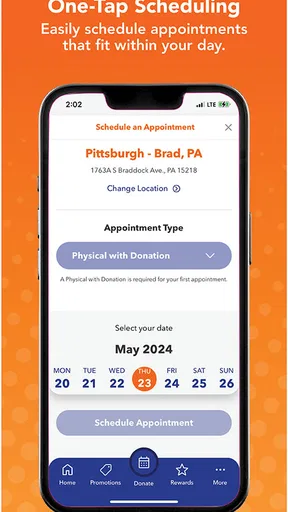
One of the standout features of the app is its ability to schedule donation appointments with ease. No more endless phone calls or website visits; everything can be done directly from the app. I could see available slots, select my preferred time, and even get reminders so I wouldn't forget my upcoming donation.
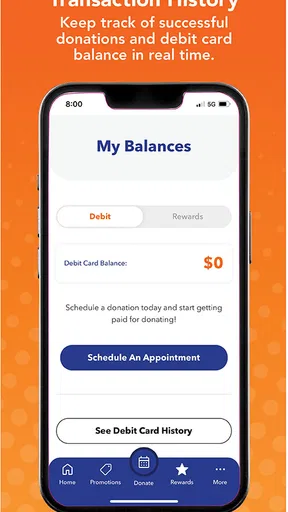
Another feature I found incredibly useful was the donation history tracker. It keeps a detailed record of all my past donations, making it easy to keep track of my contribution journey. Plus, it’s a great way to motivate myself when I see how many times I've donated over the months.
What I Loved
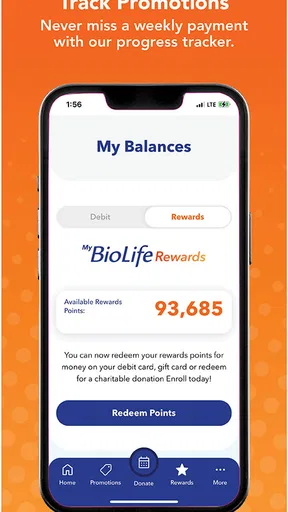
Let's talk about the rewards program. Who doesn’t love a little extra perk? The app offers loyalty rewards, tracking points for each donation, which can be redeemed for various benefits. It’s a fantastic way to give a little back to the donors.
Also, the app keeps users informed with the latest updates and news about plasma donations. This is a feature I didn’t know I needed until I had it. Being informed about how my donations are helping and any new incentives is a big plus.
Room for Improvement
While my experience was mostly smooth, there were a few times when the app ran a bit slower than expected. It wasn’t a deal-breaker, but it’s something the developers might want to look into. Also, integrating a feature to directly contact support through the app would enhance the user experience significantly.
Another suggestion would be to add a FAQ section within the app. It would be helpful for addressing common concerns right from the source, especially for new users who may have questions about the donation process.
For a realistic example, imagine I have a free morning between errands and want to fit in a donation. I can check the app for a suitable appointment, choose a time that leaves room for travel, and use a reminder so I do not rely on memory. Afterward, I can look at the history as a record of the visit. The app makes the planning side less fragmented, but I would still leave flexibility in the day: an appointment time should not be mistaken for a promise that the whole visit will take exactly as long as I expect.
Who Benefits Most—and Who May Not
I would recommend it first to people who donate at BioLife regularly and want appointment scheduling, donation history, rewards, and updates close at hand. It may also help a new donor keep the administrative side organized while getting familiar with the process. The app’s content rating is Everyone, but that does not mean every person is eligible to donate; donor suitability is a separate matter handled through the center’s screening and guidance.
I would skip it if you do not use BioLife’s services, want to compare appointments across multiple donation providers, or only need a basic reminder. In those cases, a standard calendar or contacting the relevant center directly may be simpler. Likewise, someone looking for a medical reference or urgent answer should turn to a qualified professional, not rely on a donor-services app for clinical decisions.
Compatibility and practical expectations
The current version is 3.1.4 and it runs on Android 5.0 or later. It was released on March 25, 2018, and remains a free download. If you are deciding whether to install it, the practical question is not whether it contains every health feature, but whether you expect to use its BioLife-specific tools often enough to justify keeping it on your phone.
One small workflow tip is to check the app before leaving home, rather than assuming that a reminder alone confirms all the details you need. Keep the visit information accessible, and use the center as your source for questions about preparation, eligibility, or anything that could affect a donation. The app’s strength is reducing routine friction; the trade-off is that it cannot replace a conversation when your situation needs individual advice.
Overall, BioLife Plasma Services is a handy tool for anyone involved in plasma donation. It simplifies the scheduling process, offers valuable rewards, and keeps you informed—making it a worthwhile download for both seasoned donors and newcomers alike. So, if you’re ready to join the plasma donation community, this app is definitely worth checking out!
Pros
- User-friendly interface for easy navigation.
- Regular updates enhance app stability.
- Quick access to appointment scheduling.
- Notifications for upcoming donations.
- Secure login for user data protection.
Cons
- Limited availability in some regions.
- Occasional login issues reported.
- App may crash on older devices.
- Some features require strong internet.
- Limited customer support response.
FAQs for BioLife Plasma Services
What is BioLife Plasma Services and what does the app do?
BioLife Plasma Services is an application designed to streamline the plasma donation process. It allows users to schedule appointments, track donation history, and access rewards. The app also provides information about plasma donation centers, operating hours, and eligibility requirements, making it easier for donors to manage their donation schedules and benefits.
How can I schedule a plasma donation appointment using the app?
To schedule an appointment, simply log into the BioLife Plasma Services app, navigate to the 'Appointments' section, and select a convenient date and time. The app will show available slots at your preferred donation center. Once booked, you’ll receive a confirmation, and the app will remind you of your upcoming appointment.
Does the BioLife Plasma Services app offer any rewards or incentives for donors?
Yes, the app provides a rewards program for loyal donors. Users can track their donation history and accrue points with each donation. These points can be redeemed for various rewards, which are detailed within the app under the 'Rewards' section. This incentivizes regular donations and enhances the donor experience.
Is the BioLife Plasma Services app secure and does it protect my personal information?
The BioLife Plasma Services app prioritizes user privacy and data security. It employs industry-standard encryption to protect personal and financial information. Users must log in with secure credentials, and the app complies with relevant privacy laws and regulations to ensure all data is handled with care.
What should I do if I encounter issues or have questions about the app?
If you experience any problems or have questions, the app offers a 'Help' section that provides answers to common queries. For further assistance, you can contact customer support directly through the app or via the BioLife Plasma Services website. They offer support to resolve any technical or account-related issues efficiently.


